Check this guide when someone doesn’t pick up a call, stops replying on WhatsApp or ignores a reminder, to know what Raíz did, what you can set up and what your team can do next.
Before you start
- To set up an agent’s follow-up and closing you need a role that can Create and tune agents, such as Agent design, Administration or Owner.
- To find the conversations you need a role that can See conversations and listen to calls. To write to the person or call them back, one that can Handle conversations and reply on WhatsApp.
What happens on each channel
| Situation | What Raíz does |
|---|---|
| The agent calls and nobody picks up, or the line is busy | The call stays in Conversations, closed as Errored. Raíz doesn’t call again on its own, except in a campaign set up to retry. |
| Voicemail answers | The agent can’t tell voicemail from a person: it may say its greeting to the voicemail. The transcript shows it. |
| They pick up but don’t speak | The agent speaks again after a few seconds (Wait after a pause). It only hangs up if you turned on End after silence; otherwise the call goes on until the person hangs up or it reaches the Maximum duration. |
| They stop replying on WhatsApp | If you turned it on, the agent sends them a single follow-up message. After that, the conversation closes after inactivity. |
| They don’t answer a template, such as a reminder | Usually no follow-up goes out: it needs the person to have written in the last 24 hours. The conversation closes after inactivity. |
| They stop writing in the web chat | The conversation closes after inactivity: by default, after 30 minutes. |
The call settings are under Call experience › Conversation pacing (see Agent settings).
The path of an unanswered WhatsApp
The agent asks
Its message ends in a question or options.The person doesn't reply
The time you chose goes by.A single follow-up
Your follow-up message, if you turned it on.It closes after inactivity
By default, 24 hours after the last message.Your team decides
It reviews it and reaches out again if needed.
The follow-up message only goes out if all of this holds at that moment:
- The conversation is on WhatsApp and still open.
- The last message is the agent’s, asks a question or offers options, and WhatsApp confirmed it went out.
- Nobody wrote afterwards: neither the person nor your team.
- The AI is handling it. If the conversation is with your team (AI paused or With the team), it doesn’t go out.
- The person didn’t say goodbye or ask not to be contacted.
- The person wrote in the last 24 hours.
- If the number has business hours, it’s open. If it’s closed at that moment, the follow-up doesn’t go out.
It goes out once per silence. If the person replies and then goes quiet again after another question, another one may go out.
If the agent considered the request finished, for example because it confirmed the appointment and nothing was left pending, there’s no follow-up: the conversation closes as Completed after 15 minutes without messages.
Set up the follow-up and closing
The follow-up and closing belong to each messaging agent.
-
In the menu, click Workers and open the agent.
-
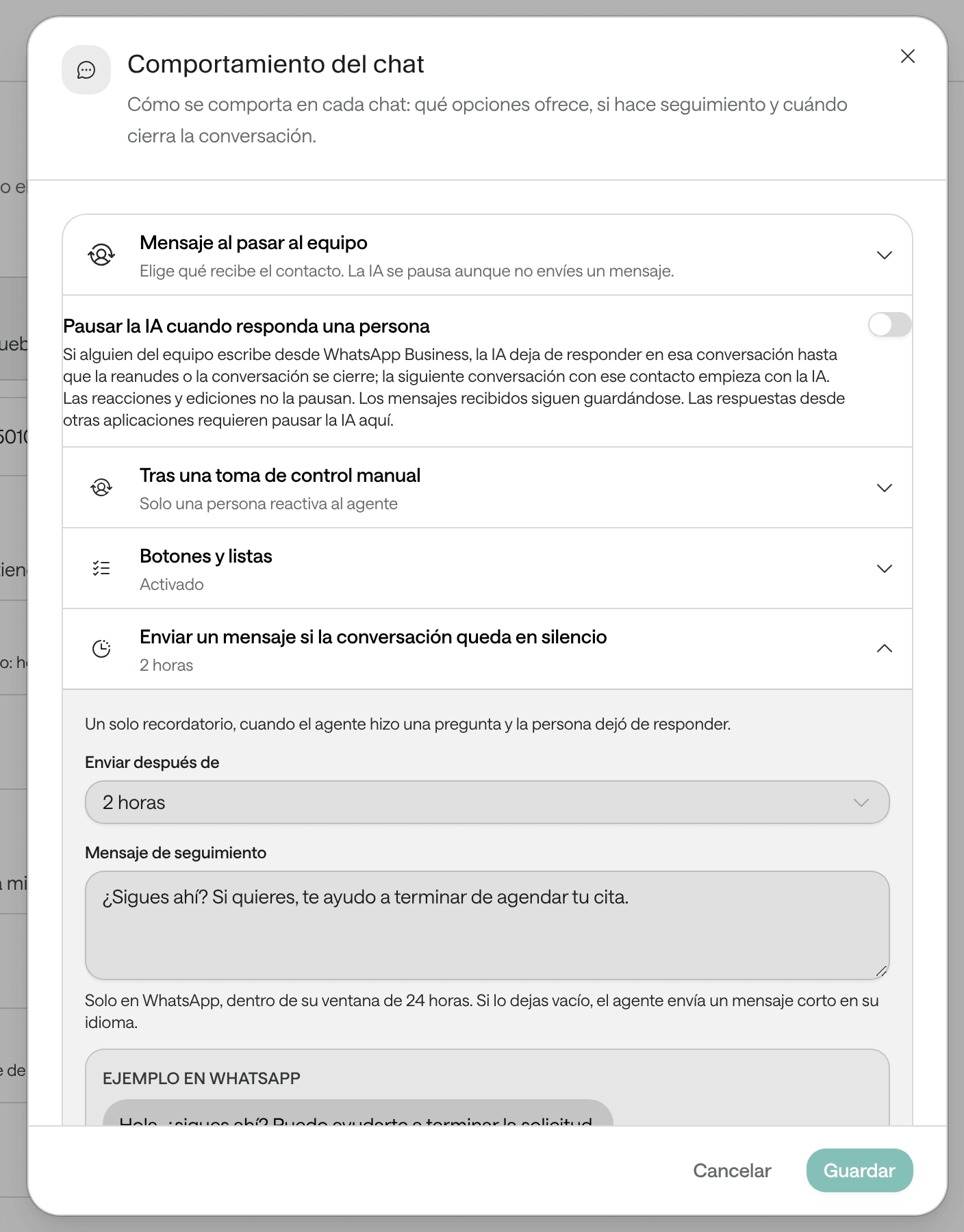
In the Chat experience block, click Chat behavior.
-
Open Send a follow-up if the conversation goes quiet and choose under Send after: 15 minutes, 30 minutes, 1 hour, 2 hours or 4 hours. Don’t follow up turns it off.
-
Write the Follow-up message. If you leave it empty, the agent sends “Are you still there? I’m here if you need anything else.” (in Spanish, if the agent serves in Spanish).
-
Open Close after inactivity and choose under Close after: Default (24 hours on WhatsApp, 30 minutes on the web), or 1, 2, 4, 6, 12 or 24 hours.
-
Click Save. You’ll see the notice “Behavior updated”.
The follow-up message is fixed: it goes out the same after any question the agent asked. Write it so it works in every case.
Avoid
Still there? Confirm tomorrow’s appointment or we’ll cancel it.
Better
Hi, are you still there? Whenever you’re ready, reply here and we’ll carry on with your request.
Don’t name an appointment, a price or a specific detail, don’t pressure the person and don’t announce consequences Raíz doesn’t apply.
WhatsApp’s 24-hour window
WhatsApp only lets a business write freely to someone during the 24 hours after their last message. After that, your organization can only write to them with a template WhatsApp approved (see Bulletins, templates and campaigns). That’s why:
- The follow-up only goes out within those 24 hours.
- Resume AI and Give back to AI and continue only work within that time (see Handle a WhatsApp conversation).
- If your organization opened the conversation with a template, such as a reminder, and the person hasn’t written to you in the last 24 hours, the agent can’t write anything else until they reply.
Call campaigns: who didn’t pick up
In a campaign, a voice agent calls a list of people (see Bulletins, templates and campaigns). Whoever creates it, from your systems or with the Arbol team, decides:
- How many times at most to call each person, from 1 to 10. If not chosen, each person is called once.
- How long to wait before calling again. If not chosen, 1 hour.
- When to retry: when nobody answered, which is the default, and also, if chosen, when the call was answered but its analysis concluded it didn’t achieve its goal.
- During which hours calls may be made.
A call counts as unanswered when it didn’t connect, found the line busy or nobody spoke. When a person runs out of attempts, or can’t be called because their number is blocked, they count under Failed in Reports › Campaigns. Each attempt is a conversation with the Campaign origin.
Find unanswered conversations
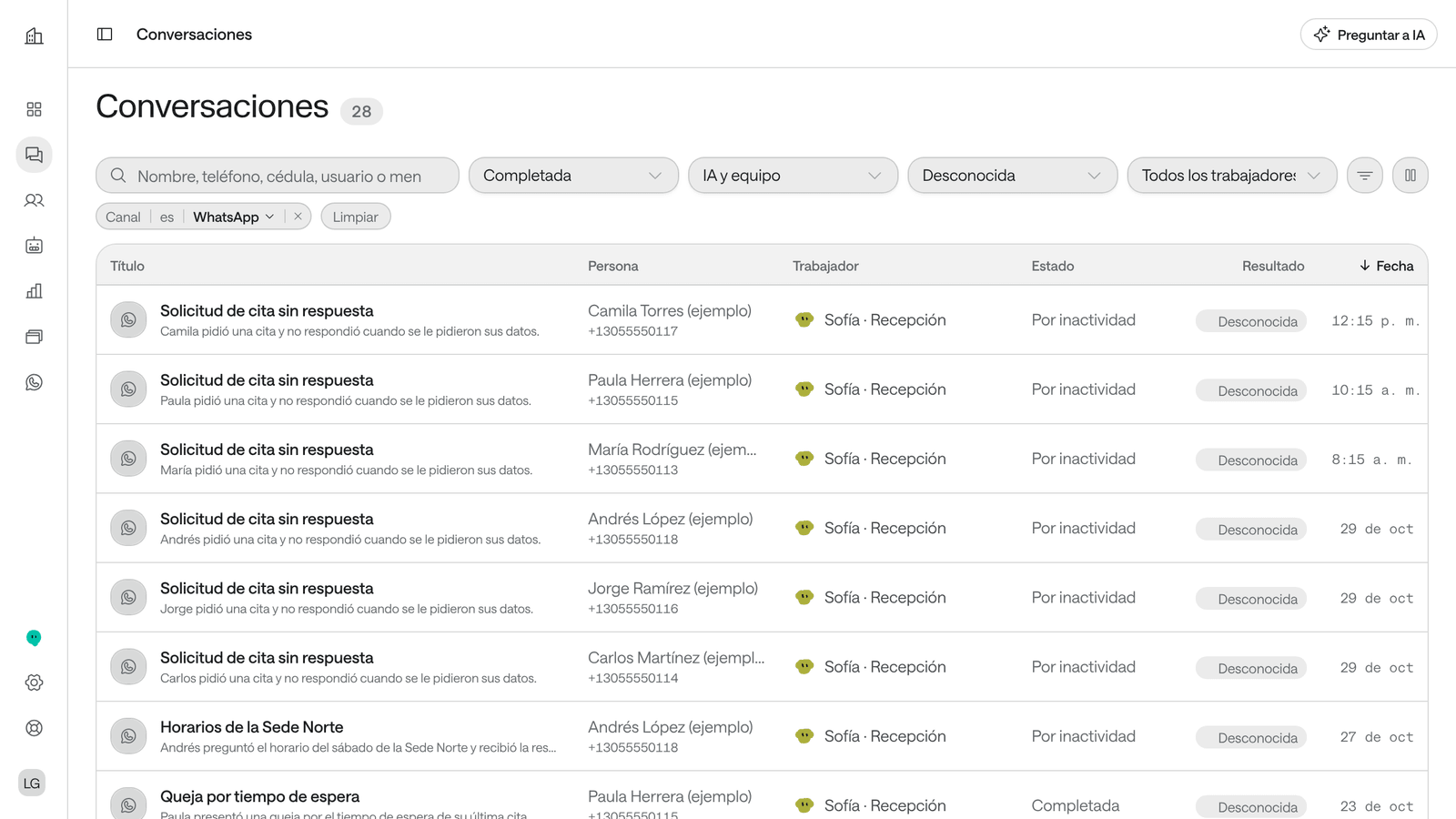
In the menu, click Conversations and use the filters. More filters has Direction and Origin.
| What you’re looking for | How to find it |
|---|---|
| WhatsApp conversations that closed because the person stopped replying | Channel › WhatsApp and Status › Completed. In the list, their status says Timed out. |
| Conversations waiting for your team | Status › Open and Handled by › Escalated by the AI. On WhatsApp they don’t close on their own: they stay open until someone closes them. |
| Calls that didn’t connect | Channel › Voice and Direction › Outbound. In the list, their status says Errored. |
| A campaign’s calls | Origin › Campaign. |
| Reminders and notices sent by your other systems, such as Agenda | Origin › Through the API. |
Keep in mind:
- A conversation closed after inactivity is never a Failure: if it wasn’t resolved, its outcome is Unknown. So, unless it was escalated, it doesn’t show in To review or trigger the failed-evaluation notice (see Notices and the daily report).
- Conversations doesn’t show whether the person read a message.
What your team can do next
- Call back. In a call, click Actions › Call back: the voice agent calls the person again and a new conversation opens. It’s unavailable if the number is blocked.
- Write on WhatsApp within 24 hours. From the WhatsApp inbox or the WhatsApp Business app (see Handle a WhatsApp conversation).
- Write after 24 hours. Only with an approved template.
- Wait for them to write. If the person writes after the conversation closed, a new conversation opens with the AI. The agent reads the summary of their earlier conversations, so it can pick up what was pending.
- Correct their details. If the phone number is wrong, correct it in their record (see People and the block list).
- Block the number if the person asked not to be contacted again (see People and the block list).
Troubleshooting
They don't pick up the call
If the call never connected, because nobody answered or the line was busy, it’s closed as Errored. Raíz doesn’t call again on its own, except in a campaign set up to retry.
What to do:
- Open the conversation and use Actions › Call back at another time of day.
- If it’s from a campaign, check in Reports › Campaigns how many people are still Pending: they’ll be called again.
- If voicemail answered, the transcript shows it: the agent can’t tell it from a person.
- Check that the person’s number is complete and has its country code.
They read it and didn't reply
Conversations doesn’t show whether the person read the message, and the agent treats it like any other silence. If the agent’s last message was a question and you turned on the follow-up, one goes out. After that, the conversation closes after inactivity.
What to do:
- Turn on the follow-up in the agent, if you haven’t.
- If it matters, write to them yourself within 24 hours of their last message.
- If they don’t want to continue, don’t insist: one follow-up is enough.
They stopped replying halfway through the conversation
If the agent had asked a question, the follow-up goes out, if you turned it on. If they still don’t reply, the conversation closes as Timed out, with its summary, and its outcome is Unknown if the request wasn’t resolved.
What to do:
- Read the summary to see what was left pending, such as a half-booked appointment.
- If needed, write to them within 24 hours or call them.
- If several people drop off at the same point, review that question from the agent: it may ask for too much at once (see What prompting is).
- If the person writes again, a new conversation opens and the agent sees the summary of the previous one.
The number doesn't exist or doesn't have WhatsApp
If WhatsApp rejects the first message when it’s sent, the conversation closes as Errored. If the rejection arrives later, the conversation stays open with no reply until it closes after inactivity, and the Dashboard doesn’t show why. A call to a number that doesn’t exist doesn’t connect either, and is closed as Errored.
What to do:
- In the conversation, click Open person and check the number and its country code.
- Correct the number or add another one with Add channel, and choose which one is used with Make primary (see People and the block list).
- If the person doesn’t have WhatsApp, reach them by phone.
They didn't answer their appointment reminder
A WhatsApp reminder is a template. If the person doesn’t reply, Raíz sends no follow-up and the conversation closes after inactivity. If your institution sends Agenda’s reminders through Raíz, you’ll find them in Conversations with the Through the API origin.
What to do:
- In Agenda, use Confirmar mañana (confirm tomorrow) to call them or write to them, and confirm the appointment when they answer (see Confirm, check in and mark as seen).
- If they don’t come, mark the appointment No asistió (no-show), with its reason (on the same page).
- So the time isn’t lost, offer it to someone on the waiting list.
The follow-up message didn't go out
The follow-up has conditions, and if one isn’t met, it doesn’t go out.
What to do: check, in this order:
- That it’s turned on in Chat behavior and that Close after inactivity is longer.
- That the agent’s last message was a question or offered options.
- That nobody on your team wrote afterwards and the AI isn’t paused.
- That the person wrote in the last 24 hours and didn’t say goodbye.
- That the number was within business hours at that moment.