Ámbar is Arbol’s product for governing the care of the population that health insurers (EPS, the payers) assign to your clinic. It keeps one record per person, groups people into cohorts, shows which care each person is still missing under each contract, shares the follow-up among your team and stores every decision with its evidence and its date.
Ámbar’s screens are in Spanish. These guides quote each label exactly as it appears on screen, in bold, followed by its meaning in English the first time it’s used.
Who it’s for
The team responsible for the population’s care and for meeting each contract uses it. Each person sees what matches their profile and their scope (their program, site or institution):
| Profile | What they do in Ámbar |
|---|---|
| Gestión de enfermería (nursing case management) | Finds people, checks what they’re missing, records calls and results, and works through their inbox. |
| Coordinación (coordination) | Shares the follow-ups among the team, watches what’s overdue and handles reports of missing appointment availability. |
| Médico tratante (treating physician) | Decides on proposed care and closes clinical alerts with a documented decision. |
| Calidad y análisis (quality and analysis) | Reads the figures, indicators and dashboards in their scope. |
| Auditoría (audit) | Reviews the indicators and what happens in their scope. |
| Administración (administration) | Sees the whole organization and sets up its team, contracts and sites. |
The roles assigned in Configuración › Equipo (settings › team) are Propietario (owner), Administración (administration), Coordinación (coordination), Profesional clínico (clinical professional), Análisis (analysis) and Auditoría (audit). Today Ámbar arranges its screens by each person’s access: whoever administers care sees everything and, with Ver como (view as), can see Ámbar as each profile in the table sees it; with clinical access, Ámbar opens straight on Mi trabajo (my work).
How it works
- The population is the people the payer assigns to your clinic. Each person has a single record, even when they’re in several contracts or cohorts.
- Contracts and their technical notes (notas técnicas) say which activities each person must receive and how often, for example a check-up or a lab test once a year.
- A cohort groups the people who receive the same activities under a contract. Ámbar matches the loaded data against each cohort’s criteria and proposes candidates; someone on the team confirms or rejects each entry.
- Pending care (atenciones pendientes) is an activity an approved technical note requires that the person doesn’t have yet. When it’s overdue, it shows up in Brechas de atención (care gaps).
- A follow-up (gestión) is the follow-up of one person under one contract: their pending care, the contact your team approves and how far it got.
- Clinical alerts are reported by the team with their evidence, and medical authorizations are decided by the treating physician.
Two rules run through all of Ámbar:
- Ámbar proposes; a person decides. Nobody enters a cohort, no care is authorized and no alert is closed without a decision from someone on the team.
- Missing data is not a “no”. When Ámbar lacks information, it shows it as Sin evaluar (not evaluated) or Por verificar (to be verified), never as unmet.
How it’s organized
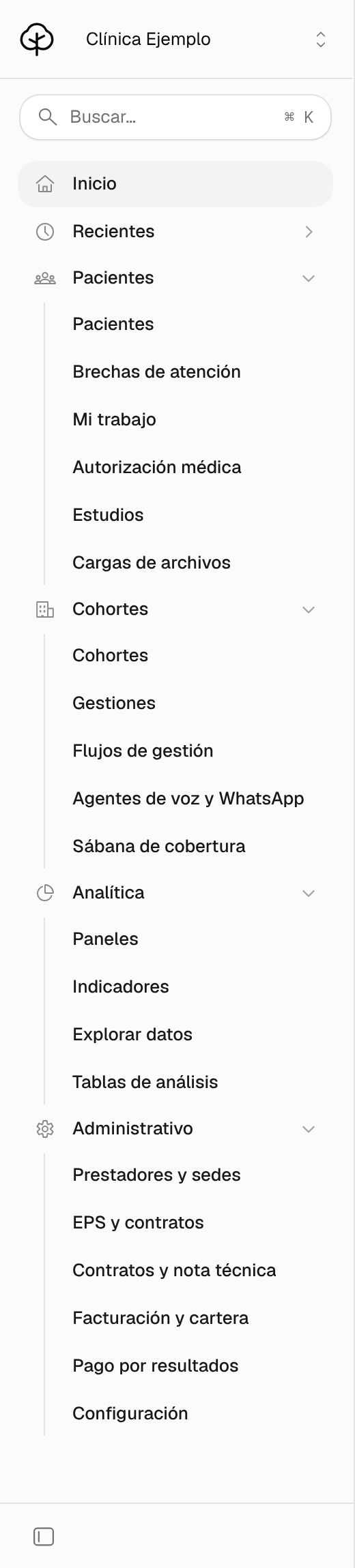
Once your organization has access, you sign in at ambar.getarbol.com with your Arbol account. The side menu has Inicio (home), Recientes (recent; and Fijados, pinned, once you pin a page) and four groups. You only see what your organization uses and what your access can open: with clinical access, the menu shows at most Pacientes, Brechas de atención, Mi trabajo, Autorización médica, Estudios, Gestiones and Paneles.
| Group | What you find |
|---|---|
| Pacientes (patients) | Pacientes, Brechas de atención (care gaps), Mi trabajo (my work), Autorización médica (medical authorization), Estudios (studies) and Cargas de archivos (file uploads). |
| Cohortes (cohorts) | Cohortes, Gestiones (follow-ups), Flujos de gestión (follow-up workflows), Agentes de voz y WhatsApp (voice and WhatsApp agents) and Sábana de cobertura (coverage sheet). |
| Analítica (analytics) | Paneles (dashboards), Indicadores (indicators), Explorar datos (explore data) and Tablas de análisis (analysis tables). |
| Administrativo (administration) | Prestadores y sedes (providers and sites), EPS y contratos (payers and contracts), Contratos y nota técnica (contracts and technical note), Facturación y cartera (billing and receivables), Pago por resultados (pay for results) and Configuración (settings). |
Next to each page’s title there’s a ?: hover over it to read what the page is for, and if your organization uses Arbi, Ámbar’s assistant, click it to ask Arbi about the page.
Choose what you want to do
Start your day in Inicio and Mi trabajo
What’s due today, your inbox, open alerts and who to assign each case to.
Find a patient and review their record
Find a person, read their record and log a call you already made.
Report and manage a clinical alert
Record a finding with its evidence so the treating physician can decide.
Review care gaps
Who has overdue care, what they’re missing and what to do first.
Work through follow-ups
Approve contact with a person and record how far it got.
Decide who enters a cohort
Confirm or reject proposed entries and add a person by hand.
Decide medical authorizations
Authorize or exclude proposed care, as the treating physician.
Frequently asked questions
Missing menu items, profiles, the population and what Ámbar doesn’t do.
What the Arbol team sets up
The connections to the clinical record, the scheduling system, the lab or the payer’s files, the agents that call or message people, and the modules your organization uses are set up by the Arbol team with you. If any of these is missing, talk to your Arbol team.