When a messaging agent gives a reply that’s wrong, incomplete or more complicated than it needs to be, your team can leave feedback on that reply. Raíz turns the feedback into an improvement to the instructions, tests it against cases from the agent’s earlier conversations and applies it only if someone approves it. These tests are different from the Evaluations you see in each conversation’s panel, which come from Conversation reports.
Before you start
- To save feedback you need a role that can Handle conversations and reply on WhatsApp.
- To prepare, test and turn on an improvement you also need a role that can Create and tune agents, such as Agent design, Administration or Owner.
- It works with the replies messaging agents write in WhatsApp conversations. Improve response doesn’t show on web chat or calls.
Save feedback
-
Open the conversation in Conversations and find the agent’s reply you want to correct.
-
Below the reply, click Improve response.
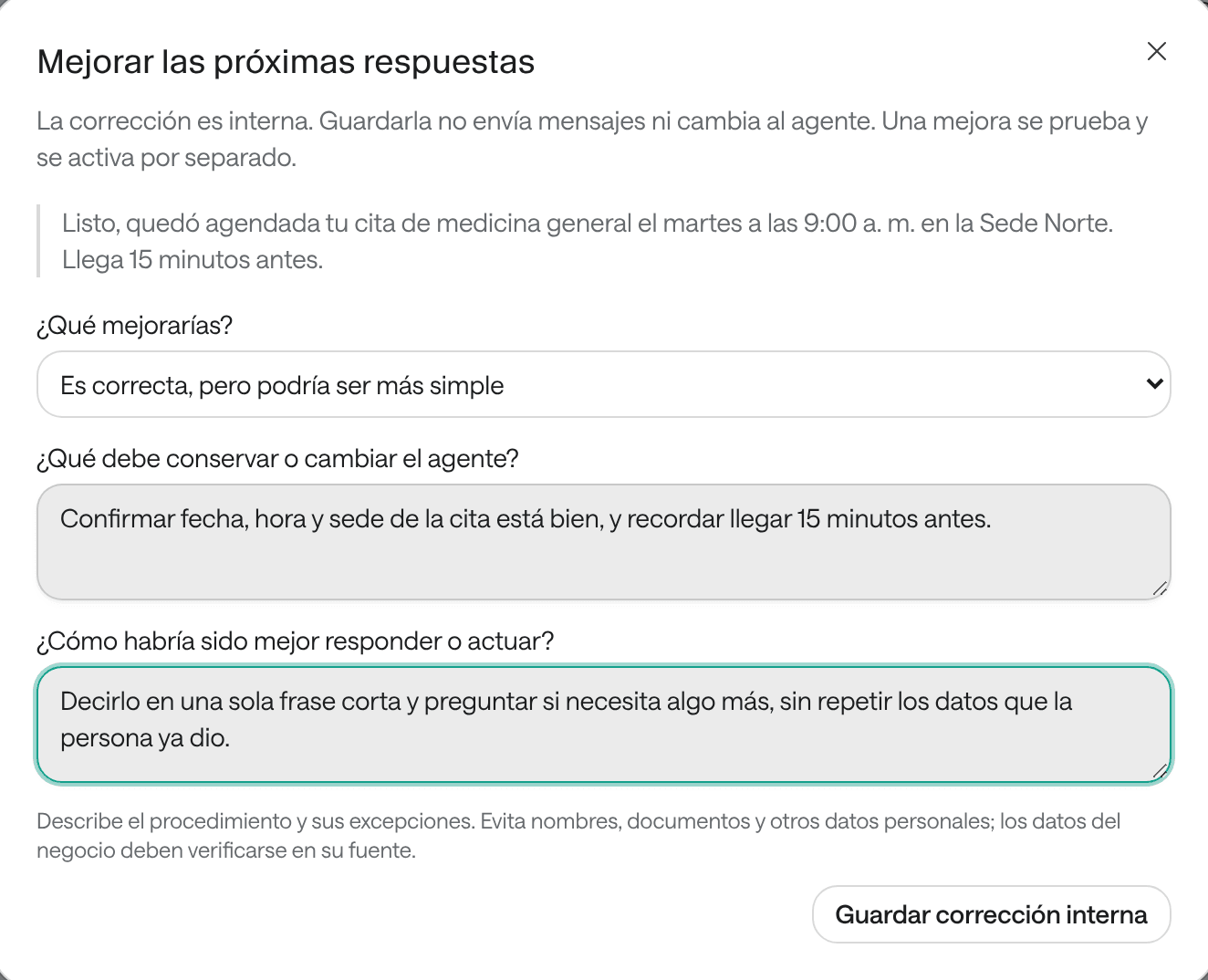
-
Under What would you improve?, choose an option:
- The response is incorrect
- It is correct, but could be simpler
- Part of the request was not resolved
-
Under What should the Agent preserve or change?, explain what you expected. Example: “If the requested site has no slots this week, it should offer the next available slot at another site”.
-
Under What would have been a better reply or procedure?, write the reply or procedure you prefer.
-
Click Save internal feedback.
Feedback is internal: saving it doesn’t send messages or change the agent. You’ll see the notice “Feedback saved. The Agent has not changed yet”.
Prepare and test the improvement
Whoever can tune agents sees, below the saved feedback, the option to turn it into an improvement.
-
Open the feedback: from the same reply, with Improve response, or from the agent’s page, in the three-dot menu › Team improvements.
-
Check I accept the model usage required to prepare and test this improvement.
-
Click Prepare and test improvement.
-
Wait for the result. Raíz prepares conditional guidance with exceptions and tests it against up to 50 kept cases for this agent. You can close the window and come back later.
Review and turn it on
When the test finishes you’ll see:
- Applies when, What it will learn and Exceptions: the proposed guidance.
- Instruction being replaced, if it changes something the agent already had.
- The case count (Passed, Failed and Not evaluated) and each case marked Passed or Needs review.
- View the full proposed instructions, to read the final result.
If the improvement passed the cases, review the change and click Approve and activate for this Agent. It applies to the agent’s next replies. If it isn’t ready, revise the feedback and prepare it again.
See an agent’s feedback
On the agent’s page, open the three-dot menu and choose Team improvements. All of that agent’s internal feedback is there; Open source conversation takes you to the corrected reply.
Troubleshooting
I don’t see Improve response. It shows on messaging agents’ replies, not on calls or automatic notices. You also need a role that can handle conversations.
I don’t see Prepare and test improvement. You need a role that can tune agents, and the feedback must be saved with no pending changes.
“The Agent or feedback changed after this run.” Prepare and test the improvement again before turning it on.
“The improvement could not be prepared.” The agent is unchanged. Try again later.