The Success rate tells you how many of the conversations your agents handled ended well. Read it when you review the week, when you change an agent or when someone asks “why did it drop?”. This page explains where the number comes from and how you change what counts as success.
Before you start
- To see the rate you need a role that can See the overview and reports, such as Analysis or Owner.
- To change what counts as success you need a role that tunes agents and what they capture, such as Agent design, Administration or Owner.
Where you see it
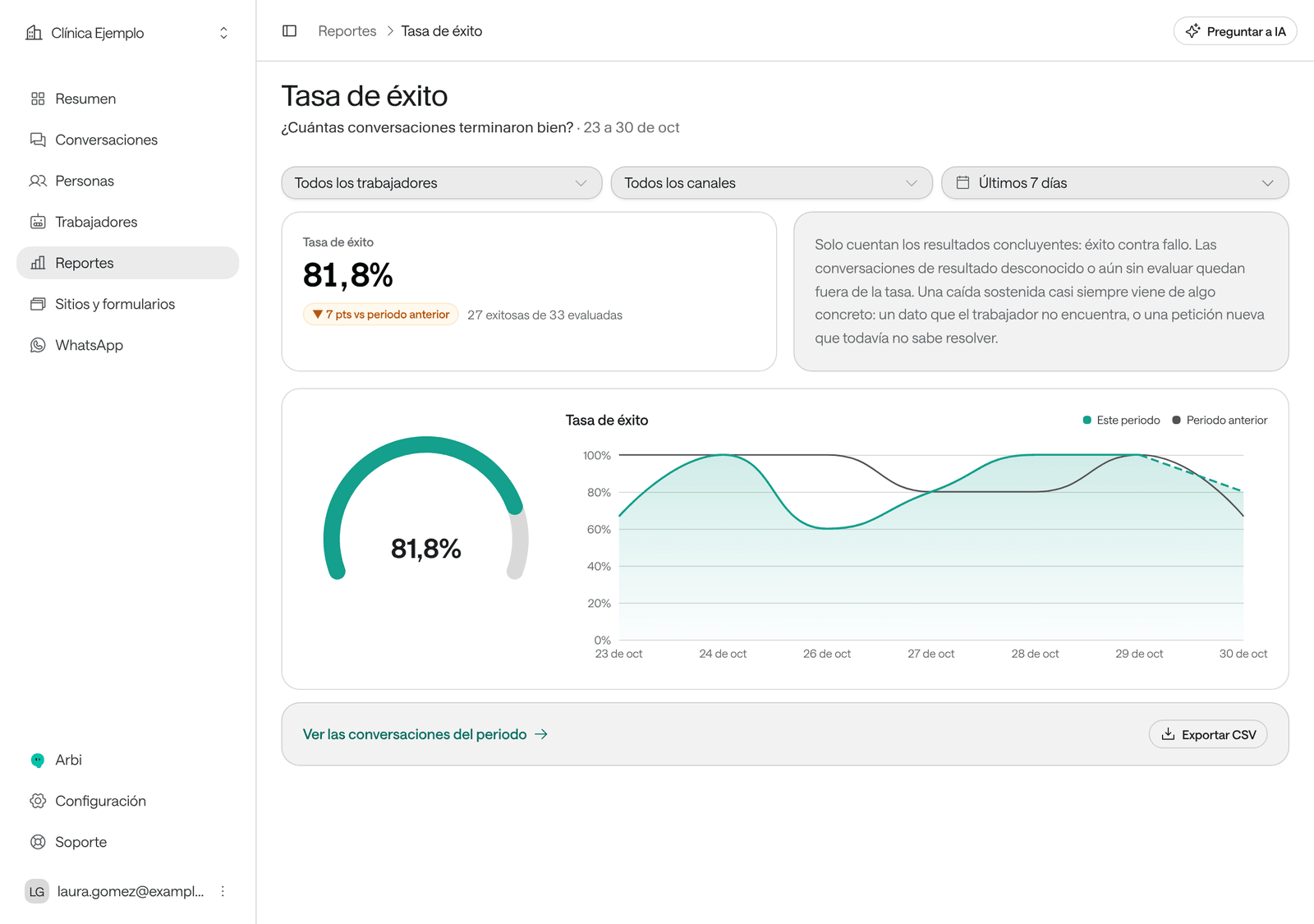
- In Overview, the Success rate card, with a line such as “27 successful out of 33 evaluated” and the comparison with the previous period.
- In Overview, Your workers shows each agent’s success.
- In Reports: Success rate, Channels, Outcomes, Period funnel and Performance by worker.
How it’s calculated
The conversation closes
When a call ends, a chat closes or a WhatsApp conversation goes quiet.
The AI evaluates it
Once, when it closes. The outcome is Success, Failure or Unknown.
It counts in the rate
Successes divided by successes plus failures.
Success rate = Successes ÷ (Successes + Failures).
These don’t count in the rate:
- Conversations with an Unknown outcome and those not evaluated yet.
- Test conversations (from Try chat, Test call and Try on WhatsApp) and imported ones.
- Conversations only your team handled, without the AI: those aren’t evaluated.
Days are counted in your organization’s time zone.
How Raíz decides whether a conversation succeeded
It depends on whether the agent has Conversation reports:
| The agent… | The conversation is a Success when… | It’s a Failure when… | It’s Unknown when… |
|---|---|---|---|
| Has no Conversation reports | The AI resolved everything the person asked for. | Something was left unresolved. Handing the conversation to the team or saying “I’ll check and get back to you” doesn’t count as resolved. | It can’t be known, for example when it was handed to the team and nobody replied. |
| Has yes-or-no Conversation reports | Every report that applies to it answered yes. | At least one report that applies answered no. | None could be answered. |
A conversation closed for inactivity never counts as a failure: if the analysis said it failed, it stays Unknown.
Change what counts as success
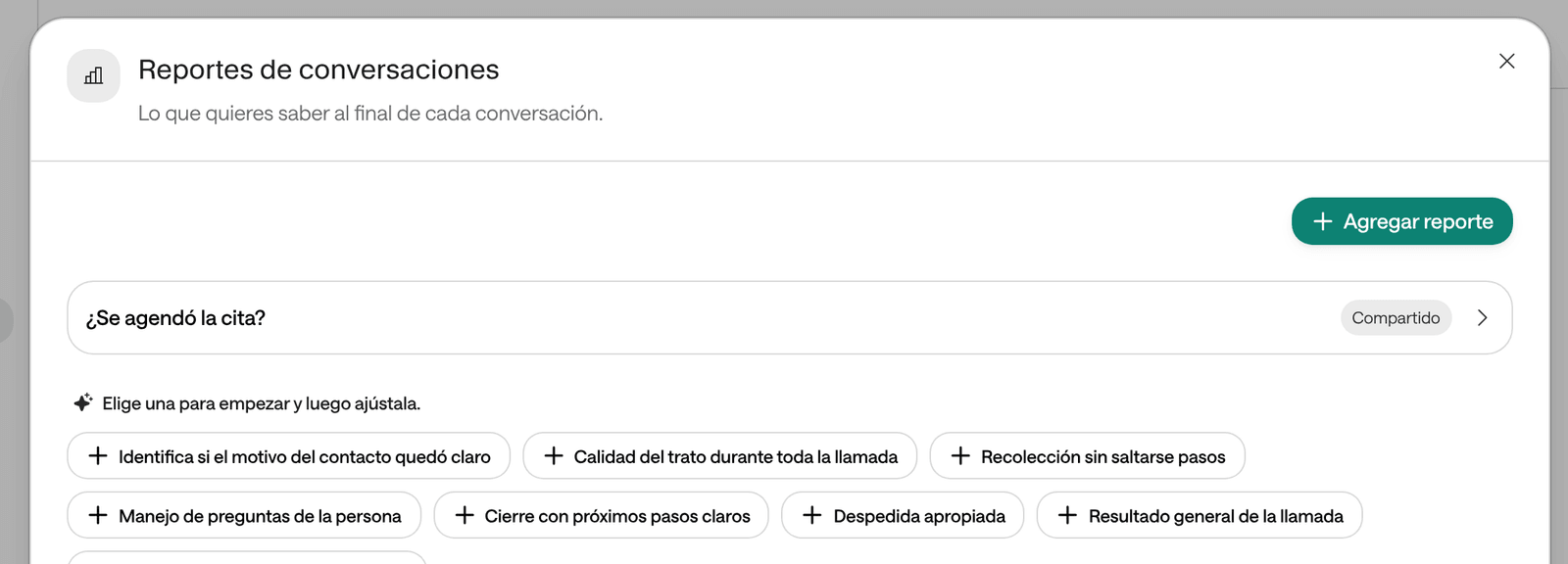
An agent’s Conversation reports are yes-or-no questions the AI answers at the end of each conversation, such as “Was the appointment booked?”. When the agent has at least one, they decide whether the conversation succeeded, instead of the general rule.
-
In the menu, click Workers and open the agent.
-
Under Work & quality, click Conversation reports.
-
Pick one of the suggestions or click Add report.
-
In What do you want to know?, write the question as you’d answer it yourself: “Was the appointment booked?”, “Was the authorization question resolved?”.
-
To spell out when it’s yes and when it’s no, click Show advanced settings and write it in Detailed instructions for the AI. For example: “Yes when the person ended with a new or rescheduled appointment confirmed. Doesn’t apply if they only asked about opening hours”.
-
Click Save. You’ll see “Report saved”.
From the next conversation that closes, the answers appear in Evaluations, in each conversation’s panel, and in Reports › Assessments.
Which questions to choose
Measuring what isn't the goal
Adding “Appropriate goodbye” or “Quality of care” to an agent whose job is booking: a conversation that booked the appointment but said goodbye curtly ends up a Failure.
One question per business goal
“Was the appointment booked?” for the front desk, “Was attendance confirmed?” for confirmations. Look at everything else in the conversations, not in the rate.
Questions that don't apply to every conversation, without saying so
“Was the appointment booked?” on an agent that also answers general questions: resolved questions count as failures.
Say when it doesn't apply
In Detailed instructions for the AI: “Doesn’t apply if the person didn’t ask for an appointment”. Those that don’t apply don’t count.
What doesn’t change the rate
- Data it collects: the data the agent extracts, even yes-or-no fields, doesn’t decide the outcome.
- Settings › Definitions: that’s where people’s data lives, not the success criteria.
- Conversation pacing and the voice: they change how the agent talks, not how it’s evaluated.
What else depends on the outcome
- To review, in Overview and in Reports: the conversations the AI escalated to your team or whose evaluation failed.
- The Conversation evaluated as unsuccessful email notice (see Get notices and the daily report): it arrives when a closed conversation ends up a Failure. With Conversation reports, one “no” is enough.
Why it went up or down
The rate dropped overnight
Check whether someone added or changed a report in an agent’s Conversation reports, or a Shared report: from that moment conversations are measured differently. Open Reports › Assessments to see which one answers “no” most often.
Many conversations come out as Failure but look well handled
Open a few and look at Evaluations in the right-hand panel: you’ll see which question answered no. It’s almost always a question that doesn’t apply to that kind of conversation. Narrow it in Detailed instructions for the AI.
The rate dropped and nobody changed anything
Filter Conversations by Outcome › Failure and read them. A sustained drop usually comes from something specific: information the agent can’t find (add it to its knowledge), a tool that fails (see Reports › Tools) or a new request the agent doesn’t know how to handle yet (adjust its instructions).
There are many Unknown conversations
They’re mostly WhatsApp conversations that closed for inactivity or were handed to the team without a reply. They don’t lower the rate, but they don’t raise it either. To reduce them, see When the patient doesn’t answer.