Arbi doesn’t write or talk to patients on its own. A call reaches someone outside your team in only two cases, and always after a person on your team approves it:
| Case | Where | Who calls |
|---|---|---|
| You ask Arbi to have an agent call a number | In Raíz, Agenda, Account or on WhatsApp | A Raíz voice agent of your organization |
| You use Llamada automática (Arbi) (automatic call) on a follow-up | In Ámbar | The voice agent the Arbol team set up for your organization |
In both cases, it’s a real call to a phone.
Ask Arbi for a call
It’s for a one-off call: testing a voice agent by having it call you, or having an agent call a patient. To call a list of people you use a campaign.
Before you start
- You need a Raíz role that allows Handle conversations and reply on WhatsApp.
- The voice agent must be ready to call. Raíz doesn’t call a blocked number.
- Have the number with its country code. In the example: +57 555 0142.
Steps
-
Ask Arbi with the agent and the number. For example: “Have the Reminders (example) agent call +57 555 0142”. If you want a special greeting or instructions for this call, say so. Otherwise the agent uses its usual setup.
-
Arbi checks the agent and tells you who will call and which number. If the agent or the number isn’t clear, it asks.
-
Review the card and approve it:
- On the web, the card says Arbi wants to use and the action that starts the call. View technical parameters shows the exact number. Click Approve.
- On WhatsApp, the Confirmar llamada (confirm call) card shows the Agente (agent), the Número que recibirá la llamada (number that will receive the call) and a notice that confirming starts a real call to that number from the agent’s line or the shared line enabled in Raíz, and that if you cancel nobody is called. Tap Iniciar llamada (start call).
-
Arbi tells you how Raíz responded: whether it accepted the call or the call didn’t go out, and why.
What happens next
- Raíz accepting the call doesn’t mean someone answered. To find out how it ended, ask Arbi again, for example “how did the call end?”. Arbi looks it up again. It doesn’t get back to you on its own.
- The call stays in Raíz, in Conversations, like any other, with its transcript.
- If it doesn’t go out, it isn’t repeated on its own. Arbi gives you the reason Raíz gave, without guessing. It doesn’t call again, or change the agent, the line or the number, without a new request and a new approval.
- If Arbi doesn’t know whether the call went out, it tells you. Check Conversations before asking for it again.
To test an agent you also have Test call on the agent’s page. See Test an agent.
Campaigns stay as drafts
If you ask Arbi to prepare a campaign, it saves a draft with the numbers and the agent, after your approval (on WhatsApp, Crear borrador). A draft calls nobody. A person with permission reviews it and starts it in Raíz. See Bulletins, templates and campaigns.
Ámbar’s Llamada automática (Arbi)
In Ámbar, a gestión (follow-up) tracks one person under one contract. When your team approves a follow-up’s contact, Llamada automática (Arbi) has a voice agent call by itself: you don’t dial the number. The agent calls whoever your team chose in A quién contactar (whom to contact: the person, their caregiver, their doctor or the clinic), with the purpose written in Qué debe lograr el contacto (what the contact must achieve), and leaves the result on the follow-up.
Ámbar proposes the contact
The follow-up appears in Por revisar.Someone approves it
With Aprobar el contacto. It moves to Por llamar.Someone starts the call
With Llamada automática (Arbi).The result lands on the follow-up
With its transcript, when there is one.
Who approves it
- Aprobar el contacto (approve the contact) and using Llamada automática (Arbi) require an Ámbar role with Autorizar y enviar comunicaciones (authorize and send communications).
- The button is only enabled if your organization has an agent set up by the Arbol team, the person has a valid phone number and the contact is already approved.
- It isn’t enabled if a contact is already in progress or another team member took the follow-up. While someone on the team holds the follow-up, automatic contact is paused.
Steps
-
In Gestiones (follow-ups), click Por llamar (to call).
-
For one person, open their follow-up and click Llamada automática (Arbi).
-
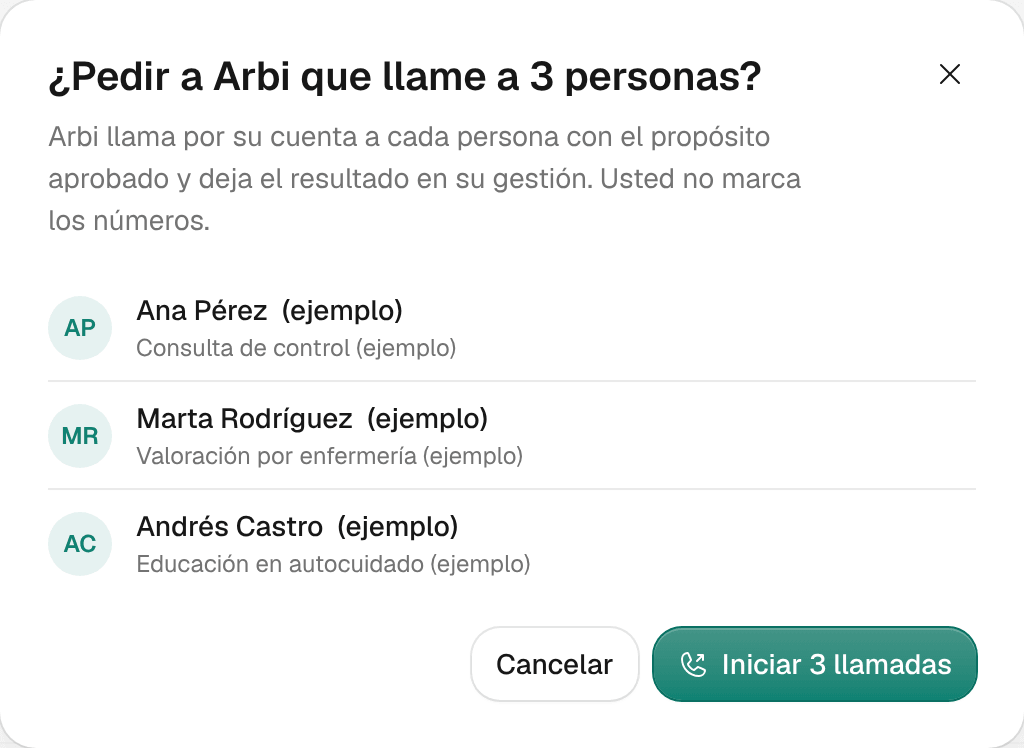
For several, select their rows and click Llamada automática (Arbi) a N gestiones (automatic call to N follow-ups), for example Llamada automática (Arbi) a 3 gestiones. Ámbar asks, for example, «¿Pedir a Arbi que llame a 3 personas?» (ask Arbi to call 3 people?) and shows who. Confirm with Iniciar 3 llamadas (start 3 calls).
On the person’s record, each automatic call shows its result, such as Habló con la persona (spoke with the person), No contestó (no answer), Pasó al equipo (handed to the team) or No salió (didn’t go out), and its transcript when there is one. The call’s result doesn’t close the follow-up: record how far it got with Registrar resultado (record result). See Work through follow-ups.
Troubleshooting
Arbi says it can't start the call
Your role doesn’t allow starting calls in Raíz, the agent isn’t ready, or Raíz rejected the call, for example because the number is blocked.
What to do: read the reason Arbi gives you. Check the agent in Raíz, or ask someone with permission for the call. If the number is blocked, don’t insist: the person asked not to be contacted or someone blocked it for a reason.
I approved the call, but the patient says nobody called
Raíz accepting the call doesn’t confirm it rang or that someone answered.
What to do: ask Arbi how it ended, or open the conversation in Raíz’s Conversations and read its result and transcript.
Llamada automática (Arbi) is disabled
Ámbar says why below the button or when you hover over it.
What to do: most often the contact still needs approving, a contact is already in progress or someone else holds the follow-up. If it says «Todavía no se puede llamar» (it can’t be called yet), something is missing to reach the person, such as a valid phone number.