Arbi remembers what you ask it to remember and reads the files you keep in its library. Each note and each document is yours only or the whole organization’s. Read this page before saving anything for everyone.
Before you start
- Open the + button (More options), next to the message box. That’s where Attach a file, Documents and Memory are.
- Notes and documents are the same in Raíz, Agenda, Account and on WhatsApp. Ámbar has its own memory, explained at the end of this page.
Notes: what Arbi remembers
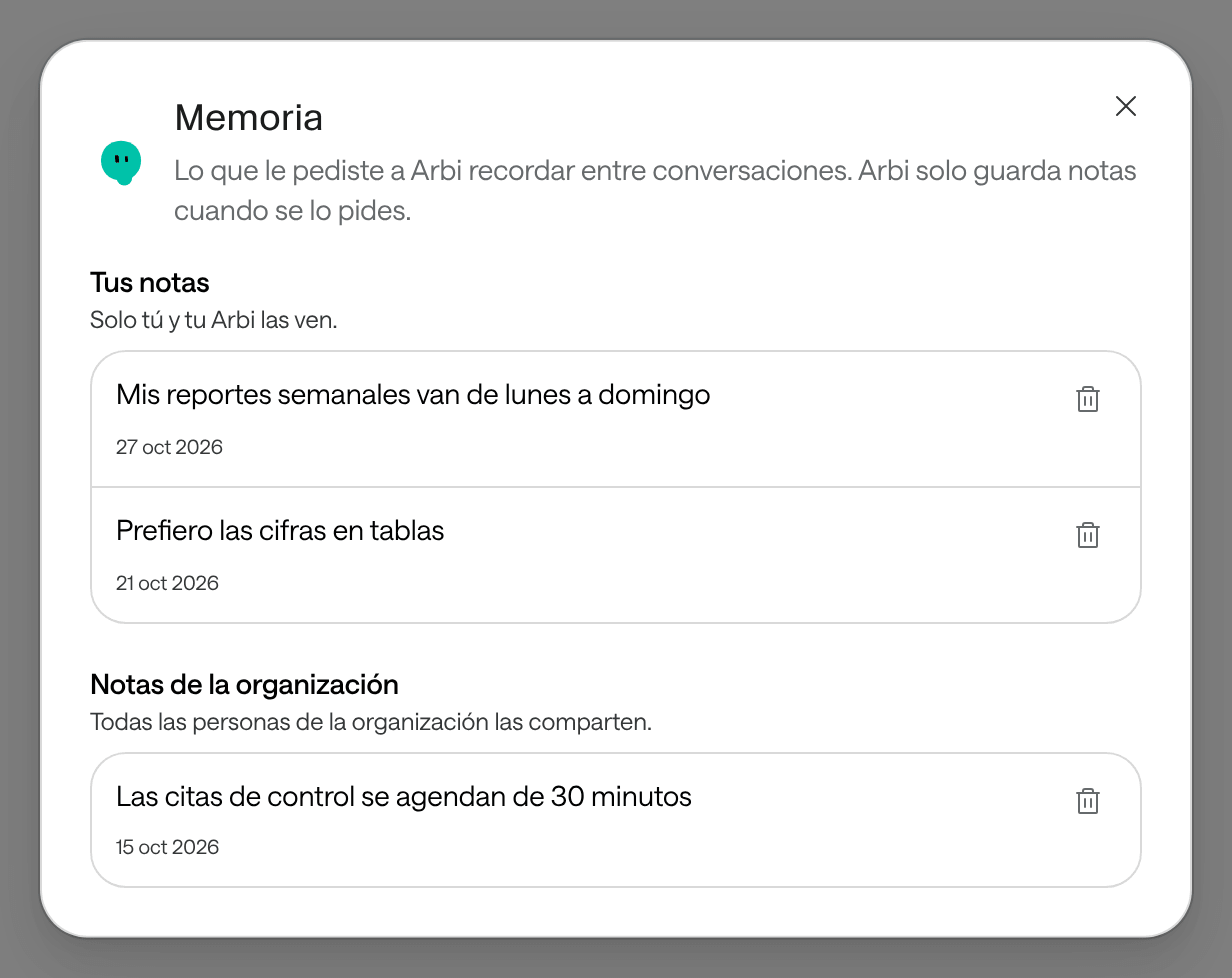
Arbi saves a note only when you ask it to, for example: “Remember that I prefer figures in tables”. It doesn’t save notes on its own. Each note holds up to 1,000 characters.
| Your notes | Organization notes | |
|---|---|---|
| Who sees them | Only you and your Arbi. | Everyone in the organization who uses Arbi. |
| Where they apply | In all your conversations, in all your organizations and on WhatsApp. | In everyone’s conversations, in that organization. |
| How they’re saved | When you ask. No approval needed. | Only if you explicitly ask to save it for the organization, and with your approval: Arbi wants to save a note for the whole organization. |
A note is context for Arbi, not the truth about your apps: even if a note says something, Arbi checks the app before answering about its current state.
Avoid
Remember for the whole organization that Ana Pérez (example),
at 555-0142, is diabetic and always arrives late.
Better
Remember for the whole organization that follow-up visits
are booked for 30 minutes and that the North site (example)
is closed on Saturdays.
Your personal notes follow you to all your organizations. Don’t keep patients’ data there either.
See or delete a note
-
Click + and then Memory. You’ll see Your notes and Organization notes.
-
To delete one, click its trash icon and confirm with Delete note. It can’t be undone.
An organization note is deleted for everyone, and anyone in the organization who uses Arbi can delete it. You can also ask Arbi, for example “forget the note about figures in tables”: it asks you to approve it with Arbi wants to delete a note.
Documents: Arbi’s library
Arbi reads the content of the files you save and looks it up when you ask about them: PDFs, spreadsheets, text documents or images. Unlike notes, each document belongs to one organization.
Save a document
-
Click + and then Attach a file, and choose the file. You can also go to + › Documents › Upload a document.
-
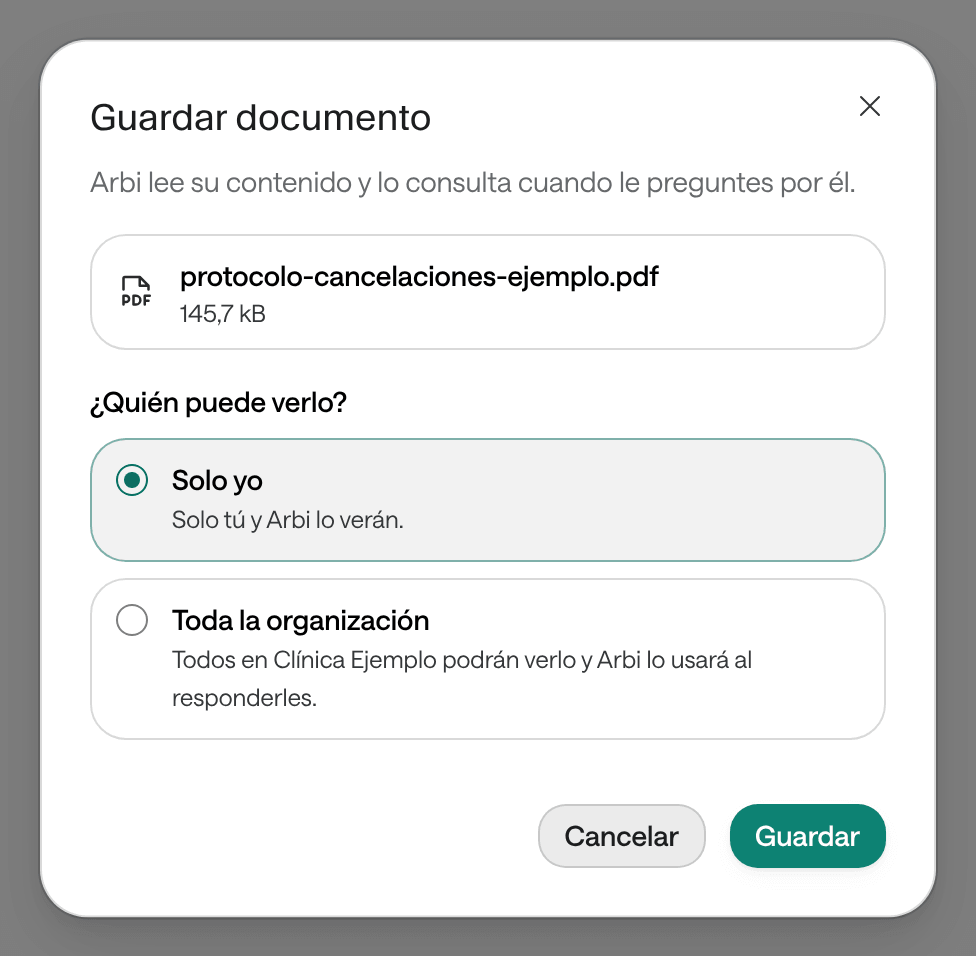
In Save the document, choose Who can see it?:
- Only me: “Only you and Arbi will see it.”
- The whole organization: everyone in your organization will see it, and Arbi will use it when answering them.
-
Click Save. Arbi tells you it’s saved: you can ask it about it now.
A file can be up to 25 MB. If Arbi can’t read a file, the list marks it with “Arbi can’t read its content”: you can download it, but Arbi doesn’t look it up.
See, download or delete documents
Click + and then Documents. You’ll see Your documents and Organization documents. From there you download a file or delete it. Only the person who saved a document can delete it, and an organization document is deleted for everyone.
Ask it for a PDF report
-
Ask with the period and what it must include. For example: “Make me a PDF report of this month’s conversations by channel, with a table by week”.
-
Arbi gathers the data and shows you the Arbi wants to generate and save a PDF card, with the file name and who will see it. Click Review document to read all of its content.
-
If it’s right, click Approve. Arbi creates the PDF, saves it in Documents and leaves you the link to download it.
The PDF is yours only, unless you ask to share it with the organization. If it includes invented data for an example, the PDF says so. If a figure was missing, it says so in the document instead of inventing it.
In Ámbar
In Ámbar, Arbi has its own memory, separate from the other apps’. On its page you find it under Lo que Arbi recuerda (what Arbi remembers):
- Mío (mine): a preference only you read. In the list it shows as Suyo (yours).
- De la organización (the organization’s): vocabulary, sites, programs or rules the whole team reads. Only someone with permission to configure Ámbar can save one.
Arbi saves a memory when you ask in the conversation, without an approval card. You can also add one yourself from Lo que Arbi recuerda with Recordar (remember): there you choose whose it is and, if you want, until when it holds. Olvidar para siempre (forget for good) deletes it. If what you type looks like a document number, a phone number or an identifier, Ámbar warns you: never save anything about a patient there, because that goes in their record.
Tareas de Arbi (Arbi’s tasks) gathers the work Arbi carries for you between conversations, such as setting up a contract. If a task has a date, Ámbar reminds you in your notices that day.