A cohort (cohorte) groups the people who receive the same activities under a contract, for example «Riesgo cardiovascular (ejemplo)» (cardiovascular risk, an example). Nobody enters on their own: Ámbar matches the loaded data (lab results, diagnoses, care delivered) against each cohort’s criteria and proposes candidates, and someone on the team confirms or rejects each entry.
Before you start
- Your organization must use Cohortes y programas de seguimiento (cohorts and follow-up programs).
- To confirm, reject or add people you need a role that allows Actualizar información y gestiones (update information and follow-ups). Without it, you see candidates as Pendiente de revisión del equipo (pending team review).
- Cohorts and their entry criteria are created by administration. During early access, the Arbol team helps you set them up.
Review your cohorts
-
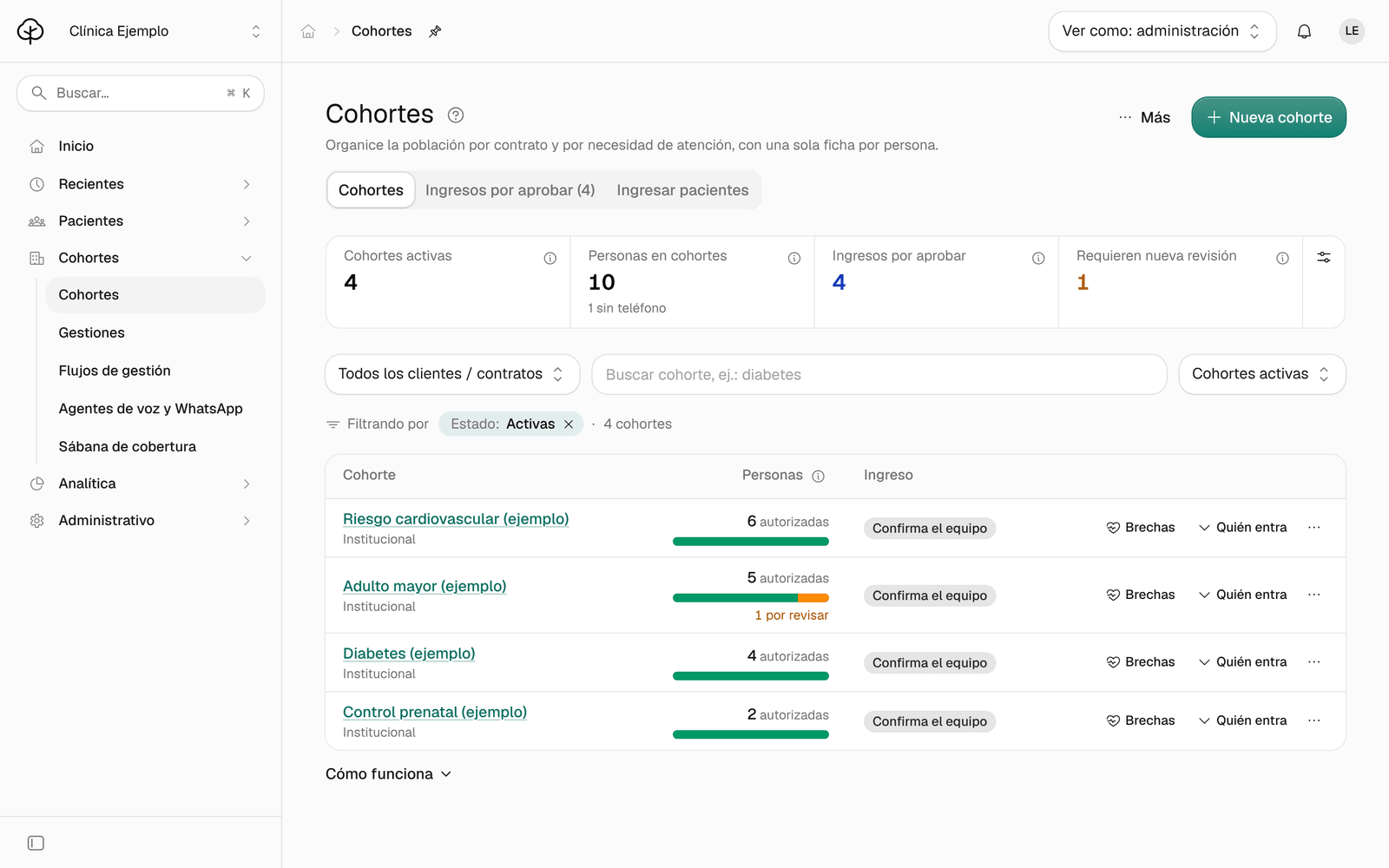
In the menu, click Cohortes (cohorts). At the top you see Cohortes activas (active cohorts), Personas en cohortes (people in cohorts), Requieren nueva revisión (need a new review) and, once you’ve opened that tab, Ingresos por aprobar (entries to approve).
-
In the list, each cohort shows its Personas (people: in green those who still meet the criteria, in amber those who need a new review) and its type of Ingreso (entry). Quién entra (who enters) expands its criteria and Brechas (gaps) opens its care gaps.
-
Click a cohort’s name to open it. Its tabs:
Tab What it holds Resumen (summary) The coverage of its activities and its figures: Personas activas (active people), Ingresos por aprobar, Programas activos (active programs) and Sin teléfono (no phone). Quién entra (who enters) The entry criteria and the entries to approve. Actividades (activities) What each contract requires of the cohort’s people. Seguimiento (follow-up) Who contacts the people, through which channel and on what schedule. Registros (records) The cohort’s own forms, if it has any. 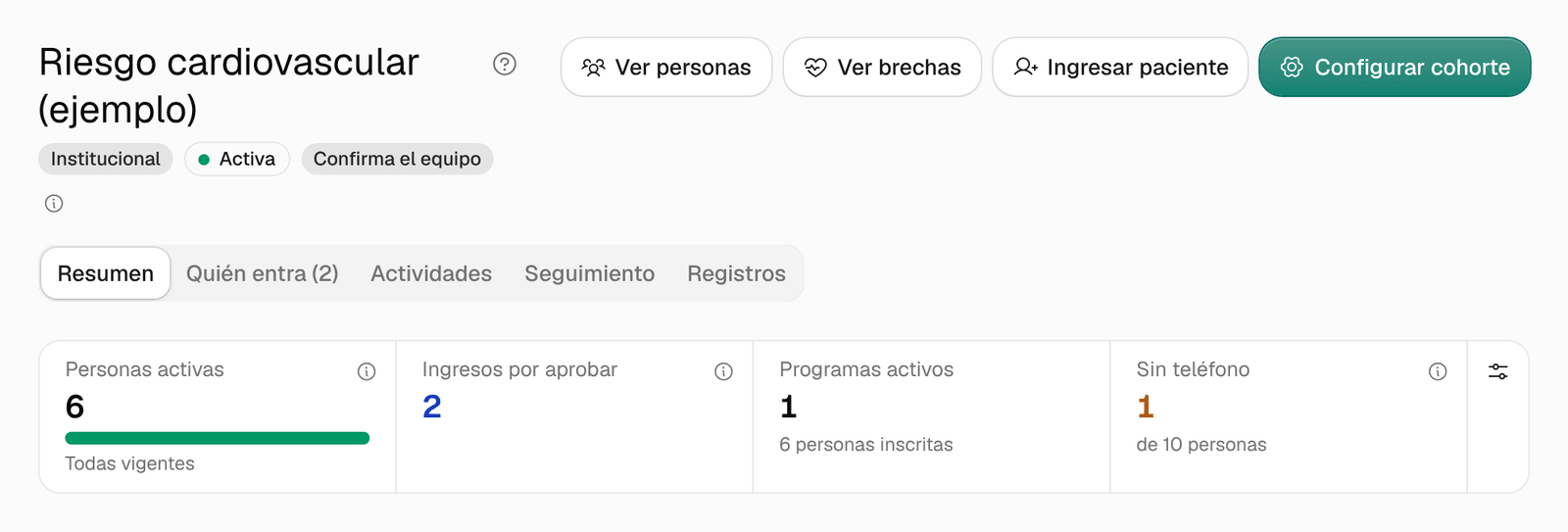
Confirm or reject an entry
-
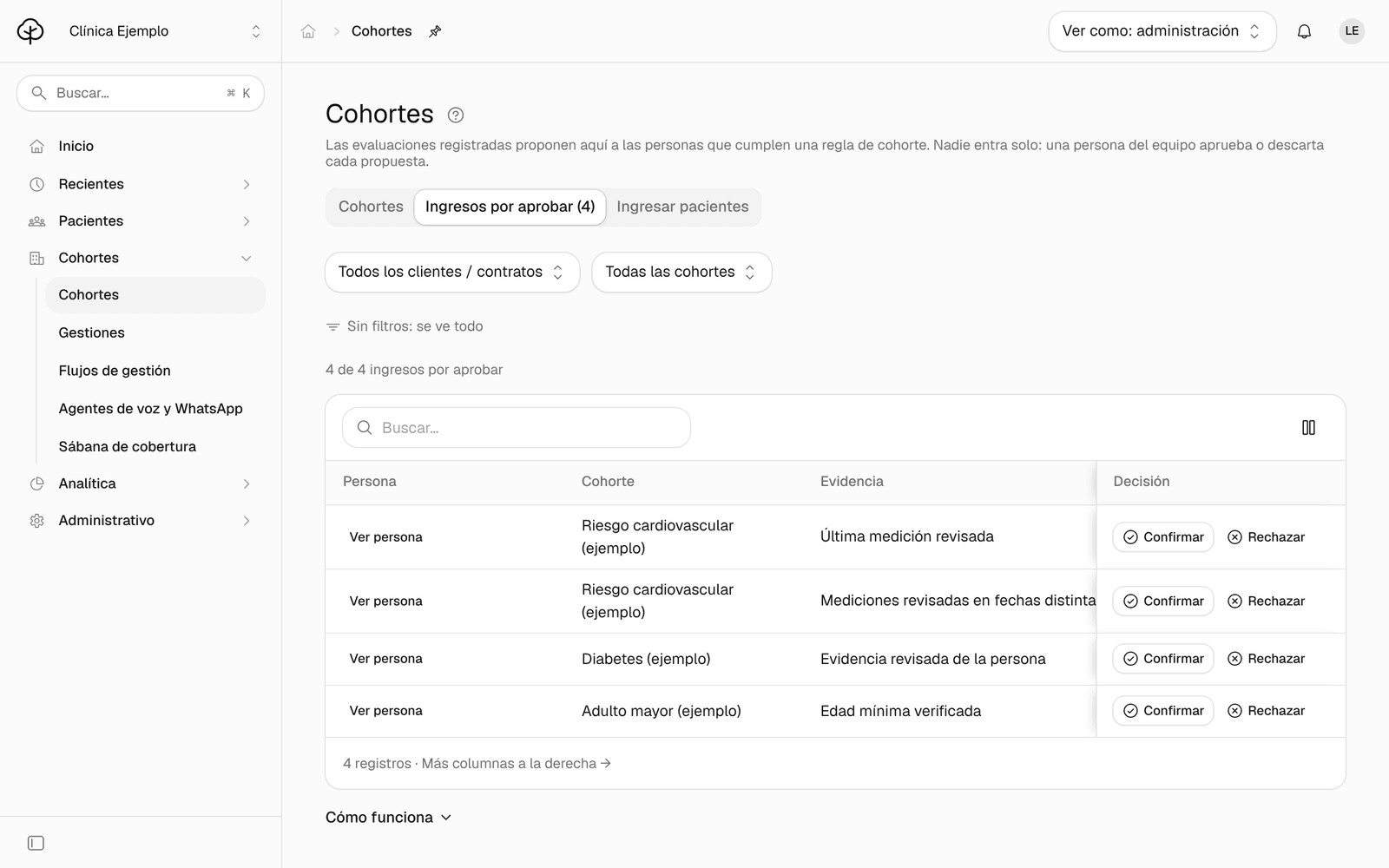
In Cohortes, click the Ingresos por aprobar tab. To see a single cohort, choose it in the filter.
-
Read each person’s Evidencia (evidence): the data that meets the cohort’s criteria, with its date in the Detectado (detected) column. Being a candidate is not a diagnosis.
-
Choose:
- Confirmar (confirm), if the evidence supports the entry. In Confirmar en la cohorte (confirm in the cohort) you can add a Nota (note); then click Confirmar. The person is added to the cohort’s current list.
- Rechazar (reject), if not. In Rechazar al candidato (reject the candidate) the Nota is required, with no sensitive clinical data. Click Rechazar. The person stays hidden until new evidence arrives.
The decision stays tied to the evidence you saw: if the data changes later, the person asks for review again. Enrolling them in a follow-up program is a separate evaluation.
Add a person by hand
Use this when a person must enter an institutional cohort for a reason your team documents, for example a referral.
-
In Cohortes, click the Ingresar pacientes (add patients) tab.
-
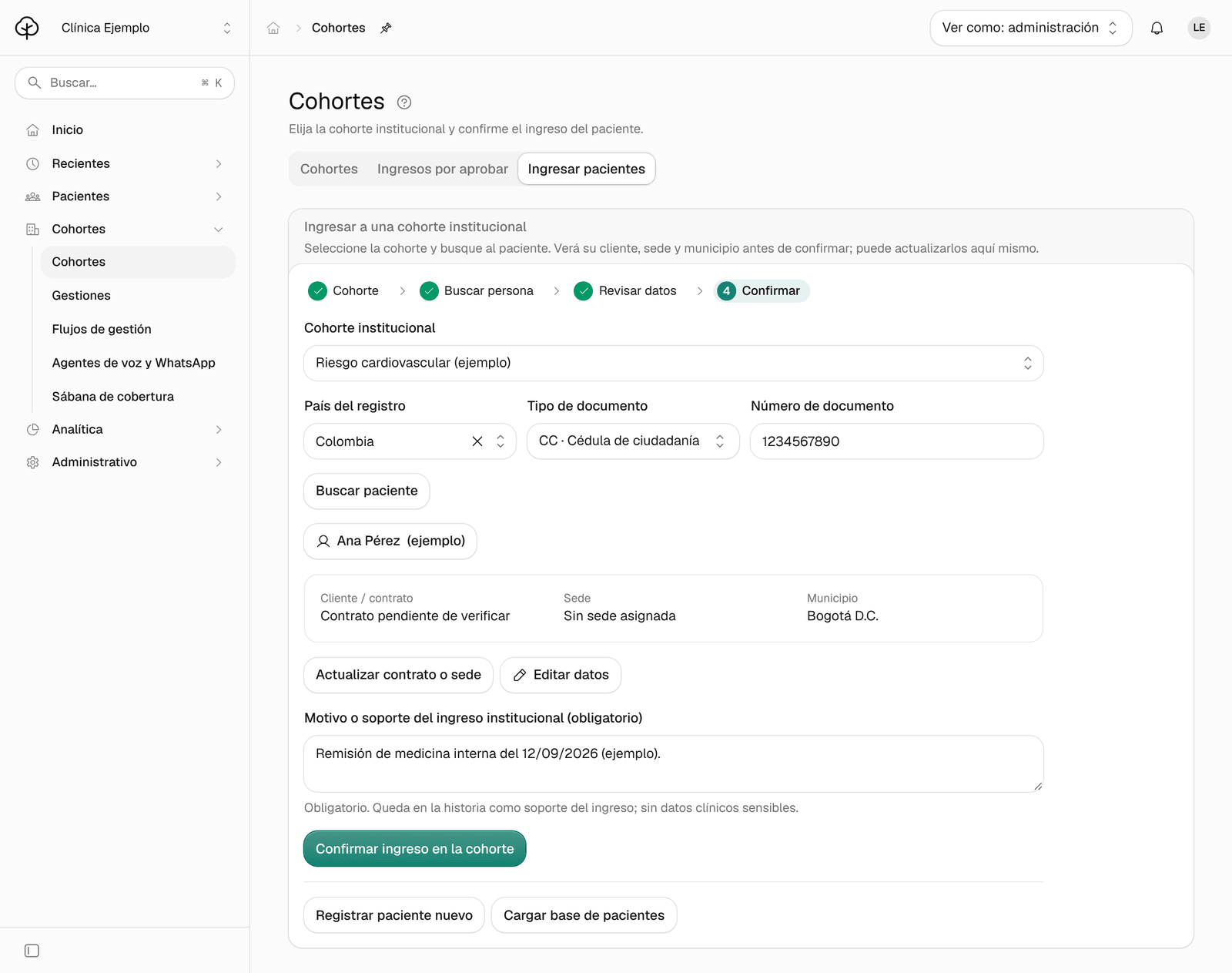
Under Cohorte institucional (institutional cohort), choose the cohort. Only those that allow institutional entry appear.
-
Choose the País del registro (country of registration) and the Tipo de documento (document type), type the Número de documento (document number) and click Buscar paciente (find patient).
-
Check the person’s contract, site and municipality. If they’re wrong, click Actualizar contrato o sede (update contract or site).
-
Write the Motivo o soporte del ingreso institucional (obligatorio) (reason or support for the institutional entry, required), with no sensitive clinical data. Example (fictional): «Remisión de medicina interna del 12/09/2026» (internal medicine referral of 09/12/2026).
-
Click Confirmar ingreso en la cohorte (confirm entry in the cohort).
Ámbar shows Ingreso confirmado. Actualizando el seguimiento… (entry confirmed, updating the follow-up), and the person’s pending care in that cohort is calculated automatically.
Common problems
- Confirmar is disabled. It’s only enabled when the person’s current evaluation meets the criteria. If it says Actualizando cohortes y pendientes… (updating cohorts and pending care), wait for the calculation to finish.
- It says «No hay candidatos por decidir» (no candidates to decide). A candidate only appears when a person’s loaded data meets the entry rule of an active cohort. To add someone by hand, use Ingresar pacientes.
- It says «Esta persona no tiene ficha» (this person has no record). Click Registrar paciente nuevo (register new patient) to create it, or upload your institution’s list in Cargas de archivos (file uploads).
- I don’t see the Ingresar pacientes tab. Your role doesn’t allow adding people.
- I don’t see Cohortes in the menu. Your organization doesn’t use that module, or your access is clinical: Cohortes is for whoever administers care. Talk to your administrator or your Arbol team.