Proposed care, such as a test, reaches Autorización médica (medical authorization) when a cohort rule suggests it or someone proposes it from a person’s record. The treating physician decides on each one; then the order is recorded in the clinical record and someone verifies that the care took place.
Your decision is recorded with its reason and its date. Ámbar doesn’t issue an external order or confirm the care on its own.
Before you start
- Your organization must use Estudios y autorización médica (studies and medical authorization).
- To decide you need the Médico tratante (treating physician) profile. Everyone else sees proposals as Decide el médico asignado (the assigned physician decides).
Steps
-
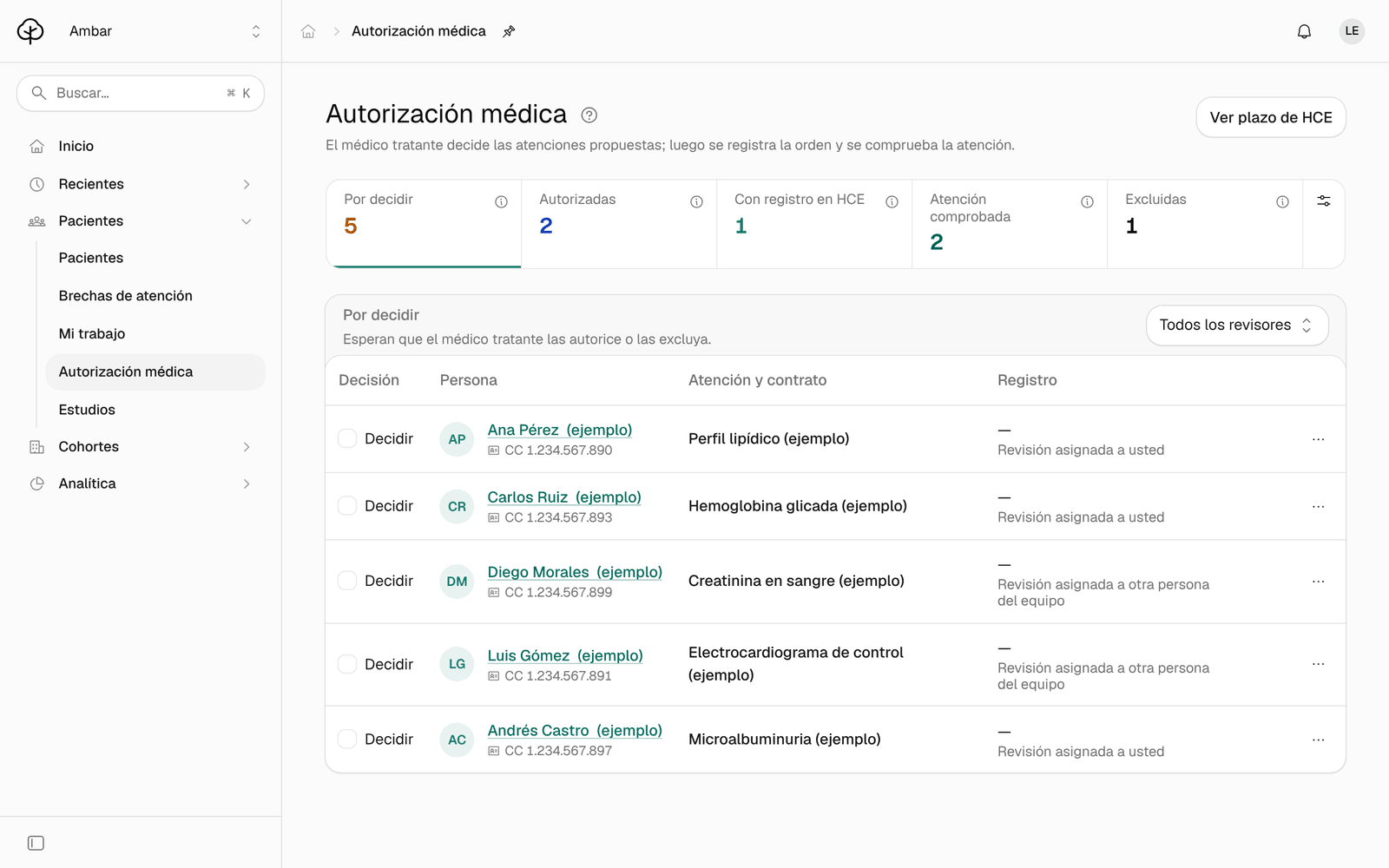
In the menu, click Autorización médica. The figures at the top are the statuses and also the filter: Por decidir (to decide), Autorizadas (authorized), Con registro en HCE (recorded in the clinical record), Atención comprobada (care verified) and Excluidas (excluded).
-
Keep Por decidir open. To see only the ones assigned to you, change the Todos los revisores (all reviewers) filter to Asignadas a mí (assigned to me).
-
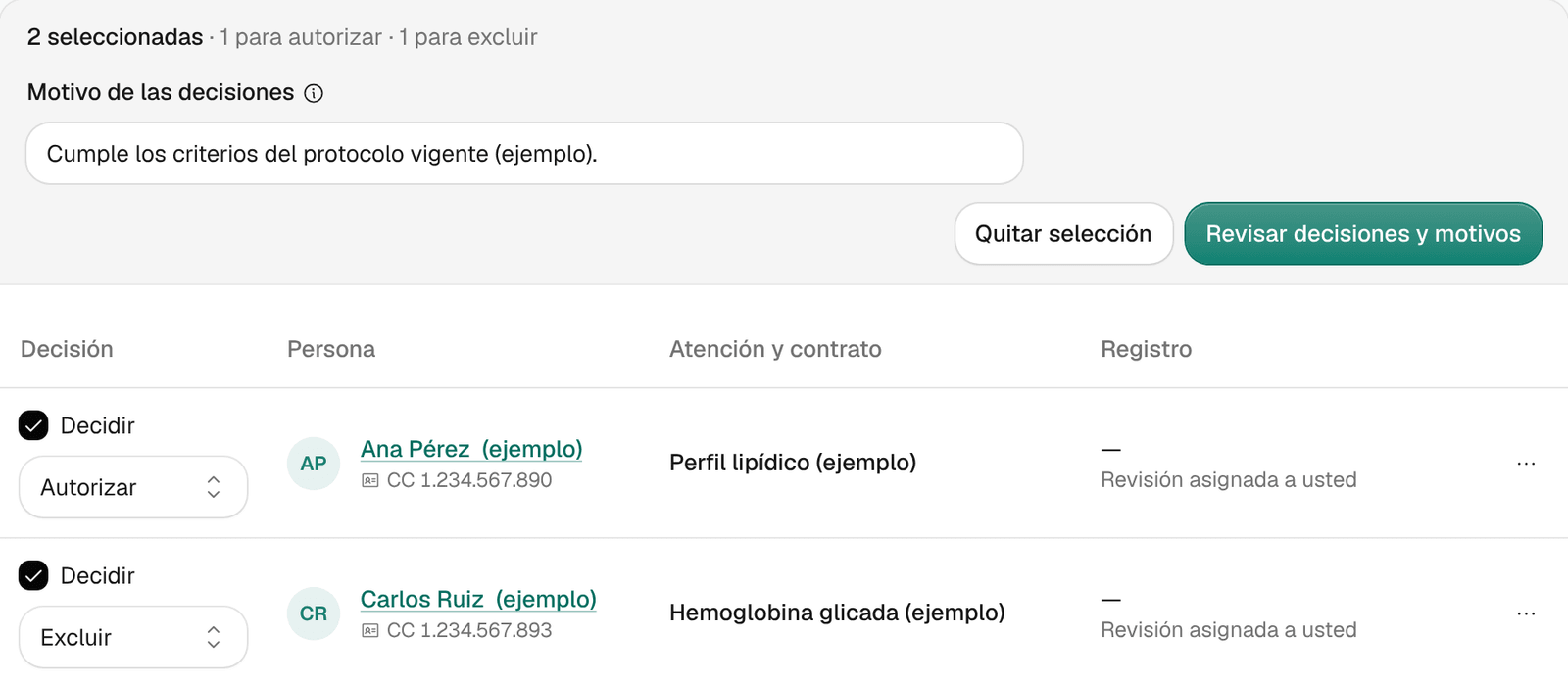
On each proposal you’re going to decide, check Decidir (decide) and choose Autorizar (authorize) or Excluir (exclude). You can check up to 40 at a time.
-
In Motivo de las decisiones (reason for the decisions), write the reason. It’s saved as your decision on each checked order. Example (fictional): «Cumple los criterios del protocolo vigente» (meets the current protocol’s criteria).
-
If Ámbar asks for Su nombre para la cita (your name for the appointment), type it: it says which physician the authorized care should be booked with.
-
Click Revisar decisiones y motivos (review decisions and reasons). Check the list of what you’re about to save.
-
Click Guardar motivos privados (save private reasons) and then Confirmar órdenes pendientes (confirm pending orders). The reason and each order are saved separately: saving the reason doesn’t change any order yet.
-
When everything is confirmed, click Cerrar (close).
What you see when you’re done
The proposals you authorized move to Autorizadas and the ones you excluded to Excluidas, with their reason. From there, each order follows its path:
| Status | What comes next |
|---|---|
| Autorizadas | The order still has to be recorded in the clinical record (HCE). That’s done with Registrar referencia HCE (record clinical record reference). |
| Con registro en HCE | The care still has to be verified. That’s done with Comprobar atención (verify care). |
| Atención comprobada | The care is linked to the recorded service, with its date and source. |
An order’s other actions, such as Asignarme como revisor (assign me as reviewer) or Cancelar la orden (cancel the order), are in its ⋯ menu. Cancelling an order is final: use it when the study won’t be done.
Common problems
- Revisar decisiones y motivos is disabled. Choose Autorizar or Excluir on every checked order, write a reason of at least 3 characters and, if asked, your name for the appointment.
- Instead of Decidir it says «Decide el médico asignado». Your profile doesn’t decide medical authorizations.
- I can’t check more proposals. You’ve already checked 40: decide those first.
- It says «Queda una respuesta sin confirmar» (a response is still unconfirmed). The connection dropped partway through saving. Click the same button again: steps already confirmed aren’t repeated.
- A figure shows “+”. There are more orders than were looked up; page through the list.
- I don’t see Autorización médica in the menu. Your organization doesn’t use that module or your profile can’t open it. Talk to your Arbol team.