Report a clinical alert when you find something about a person that the clinical team must review. Ámbar keeps what was reported, its evidence and every decision made about it.
Ámbar doesn’t diagnose or decide on treatment: it records the finding and puts it in front of whoever must decide.
Before you start
- You need a profile that can record alerts and a role that allows Acceder a información clínica sensible (access sensitive clinical information).
- The person needs an active care contract.
- Closing an alert is the Médico tratante’s (treating physician’s) decision. The rest of the team can escalate it.
Report an alert
-
Open the person’s record (see Find a patient and review their record). On the Resumen (summary) tab, look for the alerts: if none is open, a line says Sin alertas clínicas reportadas (no clinical alerts reported); if there are some, the panel is called Alertas clínicas abiertas (open clinical alerts) with their number.

-
Click Reportar alerta (report alert). Reportar alerta clínica (report clinical alert) opens.
-
If the person has several active contracts, choose the Contrato (contract). If they have only one, Ámbar shows it.
-
Under Nivel de alerta (alert level), choose Seguimiento (follow-up), Prioridad clínica (clinical priority) or Seguridad inmediata (immediate safety).
-
In Hallazgo y evidencia (finding and evidence), write the finding, the date and the source of the evidence, in at least 10 characters.
Example (fictional): «En la llamada del 3 de octubre la persona informó que no recibió su medicamento del mes. Fuente: llamada registrada en el Historial» (in the October 3 call the person said they didn’t receive this month’s medication; source: call recorded in the history).
-
Click Registrar alerta (record alert).
The alert shows up in the record’s panel, in Mi trabajo › Alertas clínicas for everyone who has the person in their scope, and in Para hoy (for today) on Inicio.
Escalate or close an alert
-
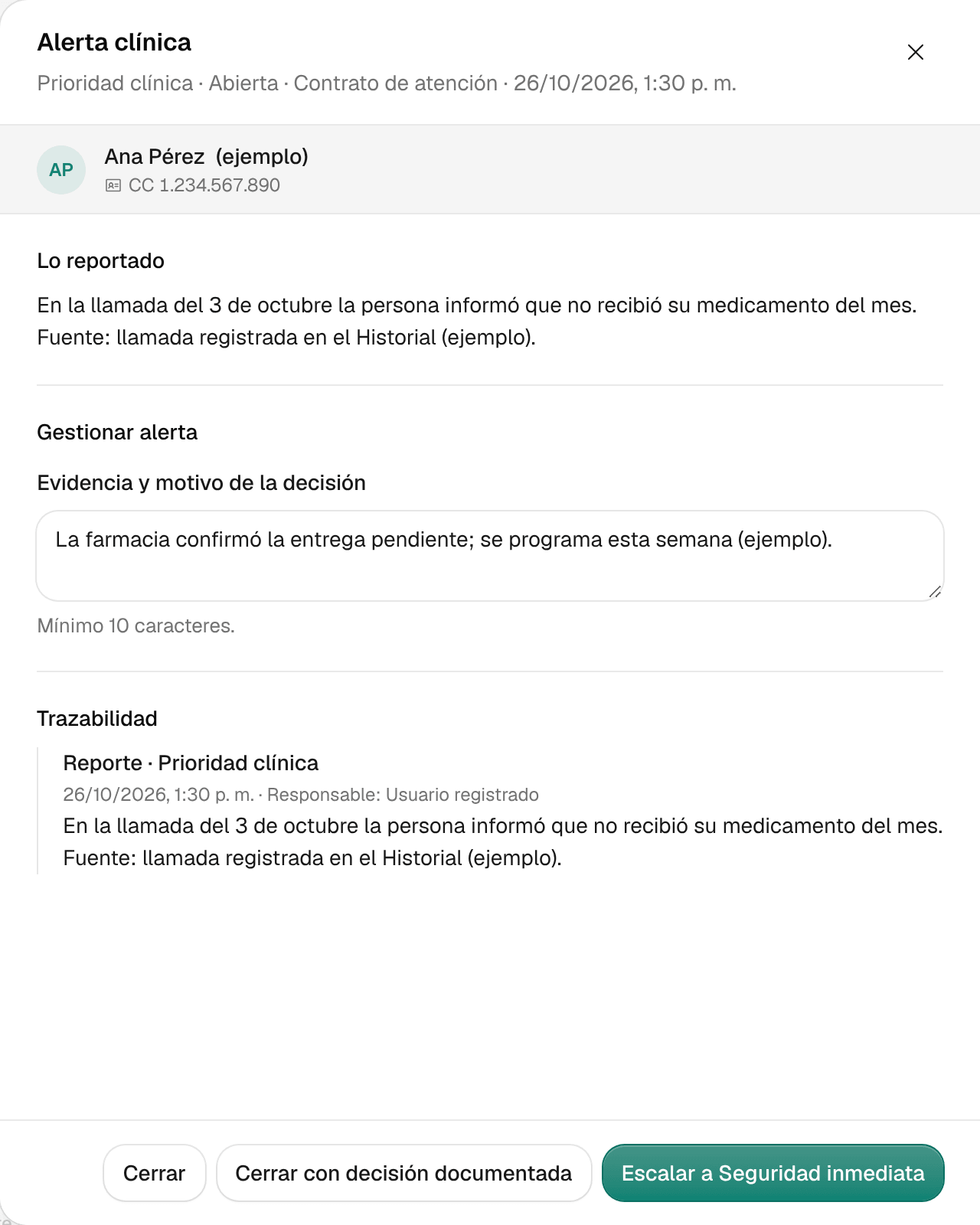
In the record’s Alertas clínicas abiertas panel, click Gestionar (manage) next to the alert. It opens with Lo reportado (what was reported) and, at the bottom, its Trazabilidad (audit trail): who did what and when.
On the record’s other tabs, a notice with the number of open alerts takes you to them with Ver alertas (see alerts).
-
In Evidencia y motivo de la decisión (evidence and reason for the decision), describe the evidence you reviewed and what you decide, in at least 10 characters.
-
Choose what to do:
- To raise the level, click Escalar a… (escalate to…), or choose the Nuevo nivel de alerta (new alert level) and click Escalar alerta (escalate alert). An alert only goes up a level, never down.
- If you’re the treating physician, click Cerrar con decisión documentada (close with documented decision).
Mental health reports
If your profile allows it, next to Reportar alerta you see Reportar salud mental (report mental health). That report keeps what was said and its source for human review: the professional decides the level, and saving it neither diagnoses nor triggers a referral. You save it with Guardar reporte para revisión (save report for review).
Common problems
- It says «Sin contrato activo» (no active contract). To report an alert, the person needs an active care contract. Check the Datos y contratos (details and contracts) tab.
- The Registrar alerta button is disabled. Choose the contract and the level, and write at least 10 characters in Hallazgo y evidencia.
- It says «El reporte cambió mientras preparaba esta gestión» (the report changed while you were preparing this). Someone acted on the alert at the same time. Your draft is kept: check the Trazabilidad before deciding.
- I don’t see Cerrar con decisión documentada. Only the treating physician closes alerts; you can escalate it.
- I don’t see the alerts in the record. Your session can’t read this person’s clinical information. Ask your administrator to review your access.