Each application lets you choose how you see it. Your choices are yours alone: they don’t change what other people at your organization see.
What each application offers
| Application | Language | Theme | Where |
|---|---|---|---|
| Raíz | Español or English | Light, Dark or System | Your user menu at the foot of the side menu: Language and Theme. |
| Agenda | Spanish only | Claro, Oscuro or Sistema (light, dark or system) | Your user menu: Tema. |
| Ámbar | Spanish only | Light or dark | Your user menu: Tema claro or Tema oscuro. |
| Account | Español or English | Light, Dark or System | Your user menu: Language and Theme. Also under Profile, in Preferences. |
System follows your computer’s or phone’s light or dark mode.
Change the language or theme
-
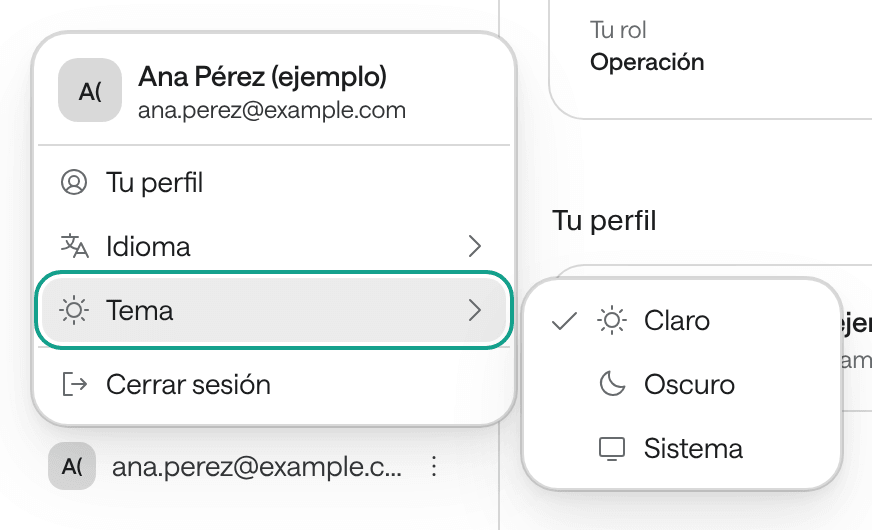
At the foot of the side menu, click your name or your email.
-
Choose Language or Theme, then the option you prefer.
In Account, changing the language reloads the page in the language you chose, and your preferences are saved in that browser: on another computer, choose them again.
The time zone in Agenda
In Agenda, your user menu also has Zona horaria (“Time zone”): the time you see the schedule in. Use it if you work with sites in another time zone.
The agents’ language is something else
The language you see the applications in doesn’t change the language agents use with your patients. That’s set on each agent, in Raíz.